MiniDrop
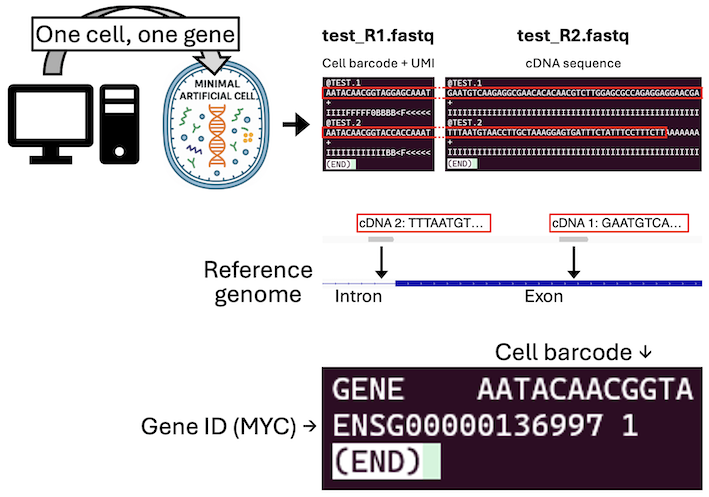
MiniDrop is a compact, easy-to-follow collection of code and explanations for droplet-based experiments, algorithms, and implementation methods.
Prior Knowledge (recommended)
Start here to understand the essential concepts before running any examples.
👉 Prior Knowledge — Droplet basics and concepts
Reading this first will greatly help when following the tutorial.
Tutorial (hands-on)
After reviewing the prior knowledge, move on to the guided tutorial.
👉 MiniDrop Tutorial — step-by-step guide
Quick Start
This repository uses Git LFS to manage large files. Make sure you have Git LFS installed before cloning.
After installing Git LFS, clone the repository with:
git clone https://github.com/keita-iida/MiniDrop.git
cd MiniDrop
Then follow the tutorial for full setup and usage instructions.
Requirements
To run MiniDrop, you’ll need a Linux or Linux-like environment with the following tools installed:
- samtools
- Picard
- Dropseq Tools
- STAR
The specific versions of these tools can be found in the environment.yaml file.
Environment Setup
The recommended way to set up the environment is using conda. If you do not have it installed, consider using Miniforge or Miniconda.
You can create and activate the environment with the provided environment.yaml file using the following commands:
conda env create -f environment.yaml
conda activate minidrop
macOS Compatibility
Unfortunately, macOS was not fully compatible in our pretests. Support for macOS is under development.
Licence
This project is available under the MIT Licence.
See the LICENSE file for details.